

Appearance
Tier 2a · Chapter 2: The Nuxt Rendering & Execution Model
JS/TS Fullstack (Nuxt) Track · ~30 min read + exercise
Why this chapter exists
You cannot make good architectural decisions about a Nuxt app without understanding where your code actually runs, and in a fullstack Nuxt app that question has a genuinely confusing answer: some code runs only on the server, some only in the browser, and some runs on both — first on the server during SSR, then again on the client during hydration. This is the single most important mental model in fullstack Nuxt, and the source of most of its confusing bugs. A function that works perfectly when you think of it as "backend code" breaks mysteriously because it also ran in the browser where process doesn't exist; a component that renders fine on the server flickers or errors on hydration because the two renders disagreed. Understanding the execution model turns these from baffling into predictable.
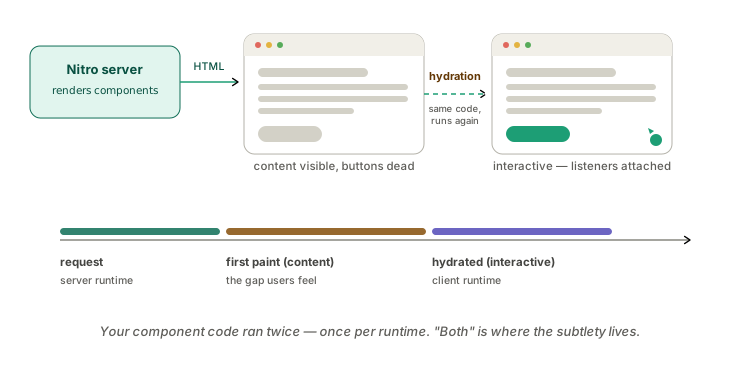
The one idea to internalize: in Nuxt, code can run on the server, on the client, or on both — and "both" is where the subtlety lives. A traditional backend runs on the server, full stop. A traditional SPA runs in the browser, full stop. Nuxt's universal rendering deliberately runs much of your code in both environments, which is what gives you fast first paint and SEO (server render) plus rich interactivity (client hydration) — but it means you have to know, for any given piece of code, where it executes, because the server and the browser are different runtimes with different capabilities, and code that ignores the difference breaks.
What this chapter covers
- The rendering modes — SSR, CSR, SSG, and hydration, and what each means for where code runs.
- Where code runs — server-only, client-only, and universal code, and how to control it.
- The Nitro runtime — the server side's execution model and its event-loop concerns.
- Architectural implications — designing with the two-environment reality rather than against it.
The rendering modes
Nuxt's default is universal rendering (SSR), and understanding it requires following one request through its life. A user requests a page. Nuxt renders that page on the server — running your components, fetching their data, producing complete HTML — and sends that HTML to the browser. The user sees a fully-rendered page immediately (fast first paint, and crawlers see real content, so SEO works). Then the JavaScript bundle loads in the browser and hydration happens: Vue "takes over" the server-rendered HTML, re-running the components on the client to attach event listeners and make the page interactive. From that point, the app behaves like a SPA — client-side navigation, reactive updates, no full page reloads.
The crucial consequence is in that word re-running: during SSR-plus-hydration, your component setup code runs twice — once on the server to produce the HTML, once on the client to hydrate it. This is the root of the most common Nuxt confusion. Code in a component's setup that assumes it runs once, or assumes a particular environment, runs in both, and if the two runs disagree (different data, a browser-only API, a random value, the current time), you get a hydration mismatch — Vue complains that the client render didn't match the server's, and the page may flicker or misbehave.
The other modes are variations on where and when this rendering happens:
CSR (client-side rendering) — SSR disabled, the app rendered entirely in the browser like a classic SPA. The server sends a near-empty shell; the browser does all the work. You lose fast first paint and SEO, you gain a simpler execution model (code runs once, in the browser only) and a cheaper server. Right for apps behind a login where SEO is irrelevant and first paint matters less.
SSG (static site generation) — pages pre-rendered to static HTML at build time rather than per request. The fastest and cheapest to serve (it's just static files), but the content is fixed at build time, so it suits content that doesn't change per request (marketing pages, docs, blogs). Nuxt lets you choose this per-route.
Hybrid / per-route rendering — Nuxt's route rules let you pick the mode per route: SSR for the dynamic dashboard, SSG for the marketing pages, CSR for the heavy authenticated app section. This is the architecturally mature option — match the rendering mode to each route's actual needs (the foundations' "fit the trade-off to the context," applied to rendering), rather than one global choice.
The trade-off across modes is the SSR-vs-CSR tension from Foundations Chapter 1, made concrete: server rendering buys first paint and SEO at the cost of server work and the two-environment complexity; client rendering buys a simple, cheap model at the cost of first paint and SEO. Per-route rules let you make that trade where it actually lands rather than globally.
Where code runs
Given that code can run server-side, client-side, or both, the practical skill is knowing and controlling where any piece runs. Nuxt gives you the tools; using them deliberately is the discipline.
Universal code (runs on both) is the default for component setup, composables, and plugins without a suffix. This code must be written to run safely in both environments — which means no unguarded use of browser-only globals (window, document, localStorage) or server-only ones (process, fs, database clients). The bug pattern is reaching for window in setup code that also runs on the server, where window is undefined, crashing the SSR render. The discipline: universal code uses only what exists in both environments, and anything environment-specific is guarded or moved.
Server-only code lives where the client should never see it — and this is a security boundary, not just a technical one. Anything in server/ (Nitro routes, server utilities) runs only on the server and is never shipped to the browser, which is exactly where your database access, secrets, API keys, and privileged logic belong. A backend service keeps these on the server by definition; a Nuxt app has to be deliberate, because the same project contains client code, and putting a secret or a database call in universal code would ship it to the browser. The rule: secrets, database access, and privileged logic go in server/ (or are otherwise server-only), never in universal component or composable code.
Client-only code runs only in the browser, for things that genuinely need it — code touching window/document, browser APIs, libraries that assume a DOM. Nuxt provides escape hatches: an onMounted hook (runs only on the client, after hydration), import.meta.client / import.meta.server guards to branch on environment, and <ClientOnly> to render a component only in the browser. These are how you safely use browser-only capabilities without breaking SSR — the component renders a fallback (or nothing) on the server, then the real thing on the client.
The architectural habit: for any piece of code, know which of the three it is, and use the right tool — server/ for server-only, the client guards for browser-only, and careful both-environments-safe code for universal. Most Nuxt bugs that feel like dark magic are universal code that assumed one environment.
The Nitro runtime
The server side of Nuxt runs on Nitro, Nuxt's server engine, and it's worth understanding as its own runtime because it shapes the backend-architecture decisions in the rest of this track. Nitro runs your server/ code — API routes, middleware, server utilities — and it's built to deploy to many targets: a long-running Node server, or serverless functions, or edge runtimes, from the same code. That deployment flexibility is powerful and has real architectural consequences, especially for async work (the async chapter) and operations (the ops chapter), because a serverless or edge deployment doesn't have a persistent process the way a long-running Node server does.
When Nitro runs on Node (the common case), the event-loop concerns from any Node backend apply directly, and they apply specifically to your server routes: Nitro server code is JavaScript on a single-threaded, non-blocking event loop, so the cardinal rule holds — don't block the event loop with synchronous CPU-bound work in a server route. A server route that does heavy synchronous computation (parsing a huge payload, image processing in JS, a big synchronous crypto operation) blocks the loop and stalls all concurrent requests to that server, exactly as in any Node service. The I/O-bound work that dominates server routes (database queries, external API calls, all awaited) is what Nitro handles beautifully; the CPU-bound work is what you keep off the request path (the async chapter's job). This is the backend execution model from any Node service, now scoped to "your Nitro server routes specifically" rather than "your whole backend," because in Nuxt the server is one part of a larger app.
There's an SSR-specific version of this worth flagging: server-side rendering itself runs on the Nitro event loop, so a component whose server-side setup does something slow or synchronous-heavy can stall not just its own render but the server's ability to render other requests. Slow data fetching during SSR (a slow database query, a slow external API the page depends on) directly increases time-to-first-byte and ties up the server — which is one reason the data-fetching decisions in the next chapter matter so much, and why SSR pages should fetch only what they truly need server-side.
Architectural implications
Pulling the execution model into design guidance:
Choose the rendering mode per route, by need. Don't accept the global default unexamined — use route rules to SSR the pages that need first paint and SEO, SSG the static content, and CSR the heavy authenticated sections where SEO is irrelevant. Matching mode to route is the foundations' trade-off thinking applied to rendering, and it's a decision worth making deliberately rather than inheriting.
Respect the server/client split as a security boundary. Because universal code ships to the browser, the discipline of keeping secrets, database access, and privileged logic strictly in server/ is a security requirement, not a style preference — it's the fullstack version of the trust-boundary thinking, and getting it wrong leaks credentials to the client. (The security chapter in the PHP track covers the principles; here the Nuxt-specific risk is universal code accidentally carrying server concerns to the browser.)
Write universal code defensively. Code that runs in both environments must be safe in both — no unguarded environment-specific globals, no assumptions that it runs once. Hydration mismatches, the signature bug of getting this wrong, come from server and client renders disagreeing; keeping universal code deterministic and environment-agnostic prevents them.
Keep SSR fetching lean and the event loop unblocked. Since SSR runs on the Nitro event loop, server-rendered pages should fetch only what they need server-side (the rest can load client-side after hydration — the next chapter's decision), and server routes must keep CPU-heavy work off the request path, exactly as any Node backend must.
That's the execution model: Nuxt runs code on the server, the client, or both; "both" (universal code, via SSR + hydration) is where the subtlety and most bugs live; the server runs on Nitro with the same event-loop discipline as any Node backend plus the SSR-on-the-loop wrinkle; and good architecture means choosing rendering per route, treating the server/client split as a security boundary, and writing universal code that's safe in both worlds.
Practice
Budget about ninety minutes.
Exercise 1: Map where your code runs (20 min)
In a Nuxt app you work on, pick three pieces of code — a component's setup, a composable, something in server/ — and for each, determine where it runs: server-only, client-only, or both. Then find one piece of universal code and check whether it touches any environment-specific global (window, process, localStorage) without a guard. That's a latent SSR or hydration bug.
Exercise 2: Audit the security split (35 min)
Search for any database access, secret, or API key usage and confirm each lives in server/ (server-only), not in universal component/composable code that would ship to the browser. For anything in the wrong place, sketch how you'd move it server-side (a server route the client calls). Note the risk of the current placement.
Exercise 3: Choose rendering per route (35 min)
List your app's main route groups (marketing, dashboard, authenticated app, etc.) and decide the right rendering mode for each — SSR, SSG, or CSR — justified by whether that route needs first paint, SEO, or just a cheap simple model. If your app uses one global mode, identify at least one route that would be better served by a different one.
Deliverable
A short note covering: one piece of universal code checked (and fixed if it had an unguarded environment global), confirmation that secrets/DB access are server-only (or a plan to move them), and a per-route rendering-mode recommendation for your app's main route groups with the reasoning.
Check yourself
- Explain the SSR + hydration lifecycle and why component setup code runs twice.
- Define universal, server-only, and client-only code, and the tool for each (
server/, client guards, both-safe code). - Explain why the server/client split is a security boundary in Nuxt specifically.
- Explain how the event loop applies to Nitro server routes and to SSR, and why SSR fetching should be lean.
What a strong answer demonstrates: a strong answer can say, for any given piece of code, which of the three it is (server-only, client-only, or universal) and the right tool to control it — and it treats the server/client split as a security boundary, not a style preference. The clearest signal of understanding is connecting the rendering-mode choice to need per route, and recognizing that "both" (universal code running twice via SSR + hydration, on the Nitro event loop) is where the subtle bugs and the lean-fetching discipline live.
Going deeper (optional)
- Node.js Design Patterns (Casciaro & Mammino) — the event-loop and async chapters are the deep source for the Nitro runtime's execution model.
- The Nuxt documentation on rendering modes, route rules, and the server directory, and Nitro's deployment docs. (Flagged: Nuxt/Nitro rendering, hydration, and deployment specifics are current-ecosystem knowledge, not from the course's book set.)
- Primary source: Douglas C. Schmidt, "Reactor: An Object Behavioral Pattern for Concurrent Event Demultiplexing and Dispatching" (in Pattern Languages of Program Design, Addison-Wesley, 1995) — the seminal description of the reactor pattern that underlies Node's (and therefore Nitro's) single-threaded, non-blocking event loop. It's the theory on-ramp for why CPU-bound work blocks every concurrent request and SSR render.
Key takeaways
- In Nuxt, code runs server-side, client-side, or both — and "both" (universal code via SSR + hydration) is where the subtlety and most bugs live, because setup code runs twice in two different runtimes.
- Rendering modes (SSR, CSR, SSG, hybrid) trade first-paint/SEO against server cost and complexity; choose per route by need rather than one global default.
- The server/client split is a security boundary: secrets, database access, and privileged logic must stay in
server/(server-only), because universal code ships to the browser. - The server runs on Nitro with the same event-loop discipline as any Node backend (don't block it with CPU work), plus the wrinkle that SSR runs on that loop — so keep server-side fetching lean.
Next: Data Fetching & the Server/Client Boundary — the heart of fullstack Nuxt: where data fetching should happen, useFetch vs. useAsyncData vs. server routes, and the SSR-vs-client decision made concrete.