

Appearance
Tier 2a · Chapter 3: Data Fetching & the Server/Client Boundary
JS/TS Fullstack (Nuxt) Track · ~30 min read + exercise
Why this chapter exists
This is the chapter that exists because the track is fullstack — a backend-only track has nothing like it. In a Nuxt app, one of the most consequential and most-fumbled architectural decisions is where data fetching happens: on the server during SSR, on the client after hydration, or split between them. Get it right and pages are fast, SEO works, and the server isn't doing needless work; get it wrong and you fetch the same data twice, leak server concerns to the client, stall first paint on a slow query, or ship a page that crawlers see as empty. This is the SSR-vs-client data decision from Foundations Chapter 1 — the very first example in the whole course — finally made concrete with the actual tools.
The throughline: where you fetch data is an architectural decision with real trade-offs, and Nuxt's data-fetching tools encode that decision — so you have to understand what each one actually does, not just call the one you saw in an example. useFetch, useAsyncData, $fetch, and a direct server-route call are not interchangeable; each runs in a particular place at a particular time, and choosing among them is choosing where on the server/client boundary your data lives. The fumbling comes from treating them as four ways to spell the same thing.
What this chapter covers
- The data-fetching tools —
useFetch,useAsyncData,$fetch, and what each actually does and where. - The SSR-vs-client decision — fetch on the server, the client, or both, and how to choose.
- Server routes vs. calling an external API directly — the BFF pattern and why the server layer earns its place.
- The boundary discipline — avoiding double-fetching, over-fetching on SSR, and leaking server concerns.
The data-fetching tools
Nuxt's data-fetching composables look similar and behave differently, and knowing what each does is the prerequisite to choosing well. The key thing they manage — and the reason you use them instead of a bare fetch — is the SSR/hydration boundary: they fetch on the server during SSR, serialize the result into the page, and hand it to the client on hydration so the client doesn't re-fetch what the server already got. That payload-transfer is the magic, and it's exactly the server/client boundary from chapter 1.
useFetch is the high-level composable for fetching from an URL (typically your own server routes). Called in component setup, it runs on the server during SSR, transfers the result to the client, and doesn't re-fetch on hydration — the data crosses the boundary once. It returns reactive data, a status enum ("idle" | "pending" | "success" | "error"), error, and a refresh function (plus clear to reset the state), and it's typed from the server route's return (the shared-types superpower from chapter 1). (Flagged: the older boolean pending is deprecated in favor of status and is being removed — read status instead.) It's the default tool for "this component needs data from my API."
useAsyncData is the lower-level cousin: it does the same SSR-transfer-don't-refetch dance, but you give it an arbitrary async function rather than just a URL. Use it when the fetching logic is more than a single URL call — combining multiple calls, calling a function directly, custom logic. useFetch is essentially useAsyncData wrapped around a $fetch call.
$fetch is the bare HTTP client (Nuxt's ofetch). It does not do the SSR-transfer dance — it just makes a request wherever it's called. Calling $fetch directly in setup is a common bug: on SSR it fetches on the server, then on hydration it fetches again on the client, double-fetching. $fetch is correct for event-driven fetches — inside a click handler, a form submit, a watcher — where there's no SSR/hydration concern because the call happens in response to user action, on the client, after hydration. The rule of thumb: useFetch/useAsyncData for data a component needs to render; $fetch for data fetched in response to an interaction.
A direct call to server logic is available too: in a Nitro server route, you don't HTTP-call your own API — you call the function directly, because you're already on the server. The HTTP composables are for components reaching the server; server-to-server is just function calls.
Getting these right is most of what separates a smooth Nuxt app from one that double-fetches, flickers on hydration, and confuses its developers. The tools encode the boundary; using the wrong one puts your data fetch in the wrong place.
The SSR-vs-client decision
Underneath the tools is the actual architectural decision, and it's the Foundations Chapter 1 trade-off exactly: should a given piece of data be fetched on the server (during SSR) or on the client (after hydration)? Each is a bundle of trade-offs, and the right answer is per piece of data, not a global habit.
Fetch on the server (SSR) when the data is needed for the initial render — content that should be in the HTML for first paint and for SEO, the primary data the page is about. Server-fetching means the user sees a complete page immediately and crawlers see real content. The costs: the server does the work on every request (server load, and the data fetch is on the critical path to first byte — a slow query slows the whole page's first paint, per chapter 2's SSR-on-the-event-loop point), and the data must be serialization-safe to cross the boundary (chapter 1).
Fetch on the client (after hydration) when the data isn't needed for first paint or SEO — secondary content below the fold, data behind a user interaction, personalized widgets, anything that can load a moment after the page appears. Client-fetching keeps the server cheap and first paint fast (the shell renders immediately, the data fills in), at the cost that the user sees a loading state for that piece and crawlers won't see it.
Split (SSR the critical, client-load the rest) is usually the mature answer for a real page: server-render the primary content the page is about (fast first paint, SEO), and client-load the secondary, personalized, or interaction-driven pieces (cheap server, no SSR stall on non-critical data). This is the exact "split the difference" option from the course's very first example, now with the tools to do it — useFetch for the primary data, $fetch in onMounted or on interaction for the rest.
The discipline is to ask, for each piece of data a page shows, does the first render need this, and does SEO need this? — and place the fetch accordingly, rather than reflexively SSR-ing everything (over-loading the server and stalling first paint on data nobody needed immediately) or client-fetching everything (losing SSR's first-paint and SEO benefits). It's the consistency-spectrum instinct from Foundations Chapter 3, applied to where data loads rather than how fresh it is.
Server routes vs. calling an external API directly
A fullstack-specific decision the tools surface: when your Vue component needs data from an external API or your database, should it go through your own Nitro server route, or fetch the external thing more directly? The architectural answer is almost always go through your server layer — and understanding why is understanding the backend-for-frontend (BFF) pattern that a Nuxt app naturally embodies.
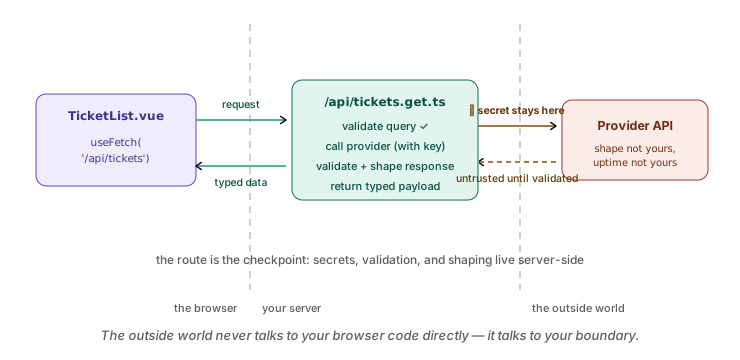
Your Nitro server layer sits between your client and your data sources (database, external APIs), and routing client data needs through it buys several things a direct client-to-external call can't:
It keeps secrets and credentials server-side. A client calling an external API directly would need that API's key in the browser — a security leak (chapter 2's security-boundary point). A server route holds the key, calls the external API server-side, and returns only what the client should see. Database access obviously must be server-side; the same logic applies to any credentialed external call.
It lets you shape data for the frontend. The external API or database returns data in its shape; your server route can transform, filter, and combine it into exactly what the component needs — the BFF's core job. This avoids the client over-fetching and doing transformation work, and keeps the client decoupled from the external API's shape (which can change without touching your components, because the server route absorbs the change — the boundary/translation instinct from the foundations).
It's the place for validation, caching, and reliability. The server route is where you validate the external response (chapter 1), cache it (the next chapter), and apply the reliability patterns — timeouts, retries, circuit breakers (Foundations Chapter 4) — around the external call. A direct client call has none of that; the server route is the natural home for it.
So the pattern is: components call your server routes (useFetch('/api/...')); your server routes call the database and external APIs, holding the credentials, shaping the data, and applying validation/caching/reliability. This is the BFF, and Nuxt's fullstack structure makes it the path of least resistance — which is good, because it's also the right architecture. The exception is genuinely public, keyless, client-safe APIs that need no shaping, which a component can call directly — but that's the minority case.
The boundary discipline
Pulling the chapter's decisions into the habits that keep the server/client boundary clean:
Don't double-fetch. The signature bug: using $fetch in setup so the data is fetched on the server and re-fetched on hydration. Use useFetch/useAsyncData for render-data (they transfer the SSR result and don't re-fetch), and reserve $fetch for event-driven calls. Double-fetching wastes a request, can cause flicker, and signals the tools are being used wrong.
Don't over-fetch on SSR. Server-rendering data the first paint doesn't need puts needless work on the critical path to first byte and loads the server for no first-paint benefit. Fetch on the server only what the initial render and SEO require; push the rest to the client. Over-eager SSR fetching is a common cause of slow time-to-first-byte.
Don't leak server concerns to the client. Keep credentials, database access, and the shaping of external data in the server route, not in universal component code — the security boundary again. The component should know only about your server route's clean, shaped, validated response, never about the database or the external API behind it.
Keep cross-boundary data serialization-honest. Everything that crosses from a server fetch to the client goes through JSON serialization (chapter 1), so the shapes must survive it — ISO strings not Dates, plain objects not class instances. The data-fetching composables transfer the payload, but they can't fix a type that serialization mangles.
That's the heart of fullstack Nuxt: where data is fetched is an architectural decision, the composables encode it (so use the right one — useFetch/useAsyncData for render-data, $fetch for interactions), the SSR-vs-client choice is the course's first trade-off made concrete (fetch on the server what first-paint and SEO need, client-load the rest), and the server layer earns its place as a BFF that holds credentials, shapes data, and applies validation, caching, and reliability — keeping the boundary clean.
Practice
Budget about ninety minutes.
Exercise 1: Audit your fetches (20 min)
In a Nuxt app you work on, find several data fetches and classify each: which composable is used, where it runs (server, client, both), and whether that's right for what the data is (render-data vs. interaction-data). Flag any $fetch in setup (potential double-fetch) and any useFetch for data only needed after an interaction.
Exercise 2: Place data on the SSR-vs-client boundary (35 min)
Pick a real page and list each distinct piece of data it shows. For each, decide: does first paint need it? does SEO need it? Place it accordingly — SSR for the primary content, client-load for the secondary/personalized/interaction-driven pieces. Note any page that currently SSRs everything (over-fetching) or client-fetches everything (losing SSR's benefits), and what you'd change.
Exercise 3: Check the BFF boundary (35 min)
Find where your components get external-API or database data. Confirm it goes through your own server routes (holding credentials, shaping data) rather than the client calling external services directly. For any direct client-to-external call, decide whether it's a genuinely-safe public API or a leak that should move behind a server route — and if the latter, sketch the server route.
Deliverable
A short data-fetching plan for one page: each piece of data placed on the SSR-vs-client boundary with the reasoning (first paint? SEO?), the right composable for each, and confirmation that external/DB access goes through your server layer (BFF) — with any double-fetch or leak you found and fixed.
Check yourself
- Explain what
useFetch/useAsyncDatado at the SSR/hydration boundary that$fetchdoesn't, and when each is correct. - State the SSR-vs-client decision and the questions that drive it (first paint? SEO?).
- Explain why components should call your server routes rather than external APIs directly (the BFF pattern) and what that buys.
- Name the boundary disciplines: no double-fetch, no SSR over-fetch, no leaked server concerns, serialization-honest data.
What a strong answer demonstrates: a strong data-fetching plan places each piece of data on the SSR-vs-client boundary by first paint and SEO — not by a global habit — and picks the matching composable (useFetch/useAsyncData for render-data, $fetch for interactions) so it doesn't double-fetch. The clearest signal of understanding is routing external/DB access through your own server layer (the BFF) and being able to name what that buys: credentials stay server-side, data gets shaped, and validation/caching/reliability have a home.
Going deeper (optional)
- The Nuxt documentation on data fetching (
useFetch,useAsyncData,$fetch) is the essential reference here. (Flagged: Nuxt's data-fetching composables and their SSR-transfer behavior are current-ecosystem knowledge, not from the course's book set — this entire chapter is Nuxt-specific architecture the books predate.) - Foundations Chapter 1 (the original SSR-vs-client example) and Chapter 3 (the consistency spectrum) are the conceptual roots; this chapter is their concrete fullstack realization.
- Primary sources: Roy T. Fielding, "Architectural Styles and the Design of Network-based Software Architectures" (doctoral dissertation, UC Irvine, 2000) — the dissertation that defined REST and the client/server, layered, and caching constraints your server-route layer embodies. And for the BFF pattern specifically, Phil Calçado, "The Back-end for Front-end Pattern (BFF)" (philcalcado.com, 2015) — the first public naming, with Sam Newman's "Backends For Frontends" (samnewman.io) as the canonical companion write-up.
Key takeaways
- Where data is fetched is an architectural decision with real trade-offs — the SSR-vs-client choice from the course's very first example, made concrete.
- The composables encode where the fetch happens:
useFetch/useAsyncDatafor render-data (fetch on SSR, transfer to client, don't re-fetch);$fetchfor event-driven/interaction fetches. Using the wrong one double-fetches. - Decide per piece of data: SSR what first paint and SEO need, client-load the secondary/personalized/interaction-driven rest, split deliberately — don't reflexively SSR or client-fetch everything.
- Route client data needs through your server layer (BFF), which holds credentials, shapes data for the frontend, and is the home for validation, caching, and reliability — rather than the client calling external APIs directly.
Next: API & Server Routes in Nitro — designing the server layer itself: server-route structure, validation, error handling, and the contract your client consumes.